Presently
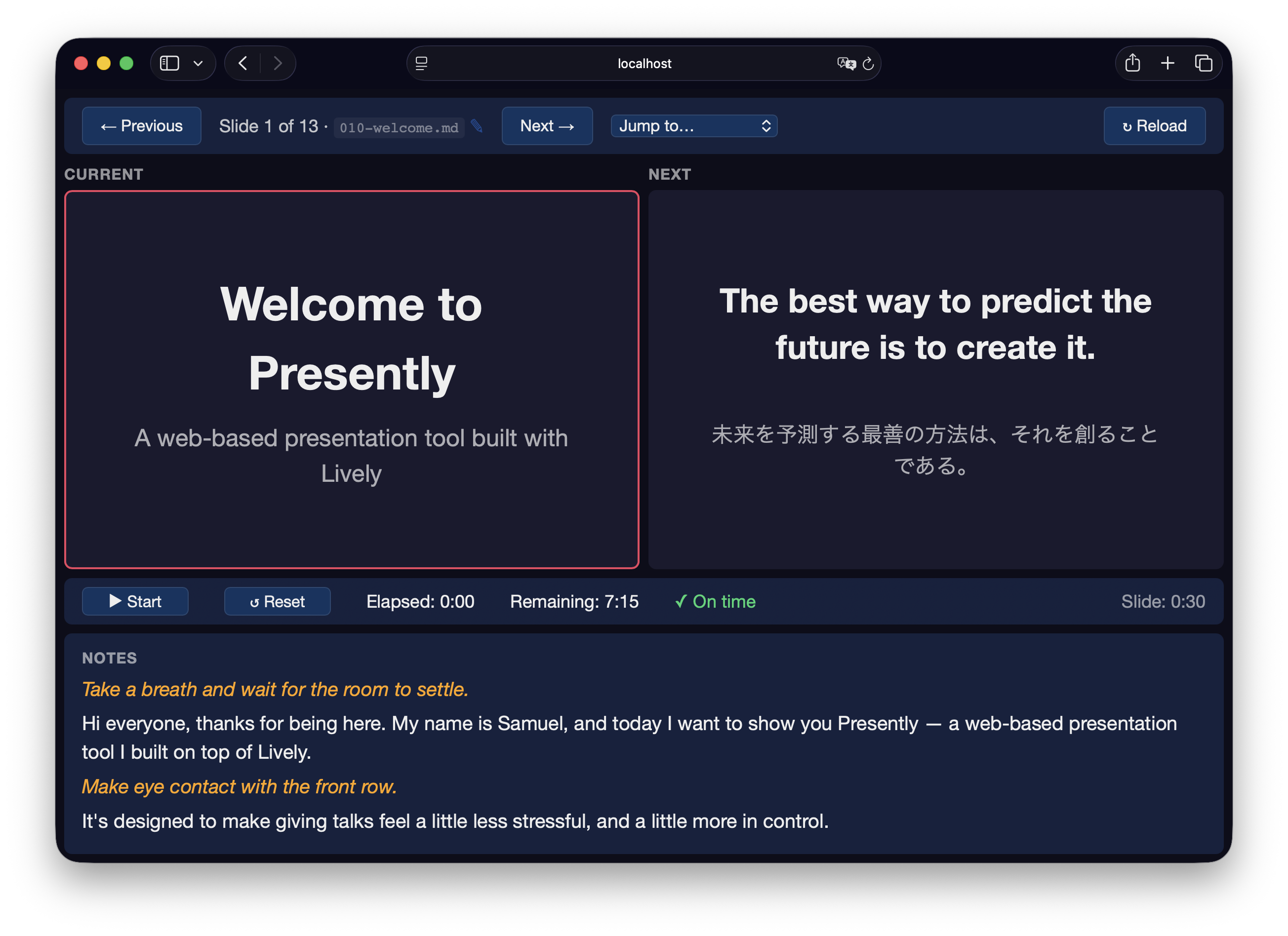
A web-based presentation tool built with Lively. Write your slides in Markdown, present them in the browser, and control everything from a separate presenter display.

Features
- Markdown slides with YAML frontmatter for metadata and template selection.
- Presenter display with current slide, next slide preview, notes, and timing.
- Real-time sync between display and presenter via WebSockets.
- Code highlighting with @socketry/syntax, including animated focus regions for code walkthroughs.
- Multiple templates — title, section, two-column, code, translation, image, and default.
- Colocated styles — presentation, directory, and slide-specific CSS can live beside the slides it styles.
- Timing and pacing — per-slide duration metadata with elapsed/remaining time and pacing indicators.
- Slide narration — record, review, and retake one audio track per slide from a dedicated recording interface.
- Narrated playback — automatically play each slide with its recorded narration, including slide scripts and transitions.
- Full-screen support — press
Fon the display view. - Keyboard navigation — arrow keys, space, Page Up/Down.
Usage
Please browse the reference index or refer to the guides below.
Getting Started
This guide explains how to use presently to create and deliver web-based presentations using Markdown slides.
Templates
This guide explains how to choose slide templates and create custom layouts in Presently.
Animating Slides
This guide explains how to animate content within slides using the slide scripting system.
Animated Diagrams
This guide explains how to design responsive, lifecycle-safe animated diagrams in Presently using semantic markup, slide-specific CSS, and Anime.js choreography.
Recording Narration
Open http://localhost:9292/recorder to record narration separately from the live presenter interface. Presently stores one WebM/Opus recording per slide under audio/, mirroring the slide's relative path:
slides/020-problem/010-overview.md
audio/020-problem/010-overview.webm
The interface preserves the microphone's dynamics for offline normalization and excludes mouse clicks at the recording boundaries using a short delayed audio pipeline. An existing recording is preserved until a completed retake is explicitly saved.
After recording, normalize every completed take to a consistent -16 LUFS target:
bundle exec bake presently:recordings:normalize
The task preserves the original files under audio/ and writes normalized copies to matching paths under audio-normalized/. It requires FFmpeg.
Open http://localhost:9292/playback to watch the narrated presentation. Playback uses normalized audio when available, falls back to the original recording, and advances when each track ends.
For automated capture, use http://localhost:9292/playback?autoplay=true&controls=false. The page exposes window.__PRESENTLY_PLAYBACK_READY and window.__PRESENTLY_PLAYBACK_FINISHED, and dispatches matching presently:playback-ready and presently:playback-finished events.
To export playback directly to an MP4 file using a Chromium build that supports Page.startScreenRecording:
PRESENTLY_CHROME_PATH=/path/to/chromium \
PRESENTLY_CHROMEDRIVER_PATH=/path/to/chromedriver \
bundle exec bake presently:export:video output=presentation.mp4
The task records the presentation at 1920×1080 and 30 frames per second by default. Use width, height, and frame_rate to select different limits. If explicit browser paths are omitted, Presently tries the current Chrome for Testing canary build.
Releases
Please browse the releases for more details.
v0.27.0
- Show Reset only while paused. Reset always sets elapsed time to the current slide's expected start. It stays paused on ordinary slides, or becomes ready at that timestamp on a
timer: startslide. Advancing starts from the preserved timestamp, which also survives saving and restoring the presentation. - Describe the effect of slide timer metadata in the Next tooltip. Show an animated Auto-start indicator when advancing from the current slide will start the timer, with a tooltip explaining how to begin.
- Make
Clock#reset!(orreset!(nil)) clear the clock to its initial, ready state. Passing a numeric elapsed time preserves whether it is running, or puts a ready clock into the paused state. Passstarted: falseto make the clock ready at a nonzero elapsed time.
v0.26.0
- Add
timer: start,timer: pause, andtimer: resumeslide metadata, applied when advancing away from a slide in the presenter or display. - Normalize slide durations to finite, non-negative floating-point seconds. Missing or invalid durations now default to
0.0, and negative durations are clamped to zero. Presentations relying on the previous 60-second default should set explicit durations. - Handle zero-duration slide progress and hide pacing indicators, progress, and remaining-time estimates when a presentation has no allocated duration.
- Keep recorder navigation from changing the presentation timer.
v0.24.1
- Use legible, customizable link colors on the default dark slide background.
v0.24.0
- Match slide duration to saved narration by default in the recorder.
- Keep scripted slides hidden until their initial script state has been applied.
v0.23.0
- Keep narrated playback visuals synchronized when the document or inactive slide frames are hidden.
- Keep recorded audio duration visible after saving a reviewed take.
- Prevent stopping a pointer-initiated recording from immediately starting a retake.
- Update slide timing from new or existing narration recordings.
- Render audience and narrated playback slides through the same client-side lifecycle so incremental builds behave consistently.
v0.22.0
- Split built-in slide and interface styles into focused stylesheets while retaining
index.cssfor shared defaults.
v0.21.0
v0.20.1
- Keep presenter toolbars within the viewport when slide paths are long.
v0.19.0
- Keep Anime.js resources created by delayed slide callbacks bound to the slide lifecycle.
- Support language-prefixed inline code such as
ruby:for syntax highlighting. - Preserve blank lines within consistently indented HTML blocks in slide Markdown.
v0.18.0
- Render slides on a responsive 16:9 canvas across the display, presenter, recording, playback, and export interfaces.
- Center diagram content by default, add optional diagram titles, and make free-form absolute positioning explicit with
.diagram-freeform. - Prevent slide backgrounds and content from flickering during view transitions.
- Add lifecycle-managed Anime.js animation scopes, reusable diagram setup scripts, and guidance for authoring animated diagrams.
- Truncate long slide paths responsively while preserving their filenames in presenter controls.
- Preserve the complete saved presentation state when restoring the controller.
See Also
Contributing
We welcome contributions to this project.
- Fork it.
- Create your feature branch (
git checkout -b my-new-feature). - Commit your changes (
git commit -am 'Add some feature'). - Push to the branch (
git push origin my-new-feature). - Create new Pull Request.
Running Tests
To run the test suite:
bundle exec sus
Making Releases
To prepare a release branch and open a pull request from an up-to-date main:
bundle exec bake gem:github:release:patch # or minor or major
See bake-gem-github for setup, remote releases, and recovery.
Developer Certificate of Origin
In order to protect users of this project, we require all contributors to comply with the Developer Certificate of Origin. This ensures that all contributions are properly licensed and attributed.
Community Guidelines
This project is best served by a collaborative and respectful environment. Treat each other professionally, respect differing viewpoints, and engage constructively. Harassment, discrimination, or harmful behavior is not tolerated. Communicate clearly, listen actively, and support one another. If any issues arise, please inform the project maintainers.